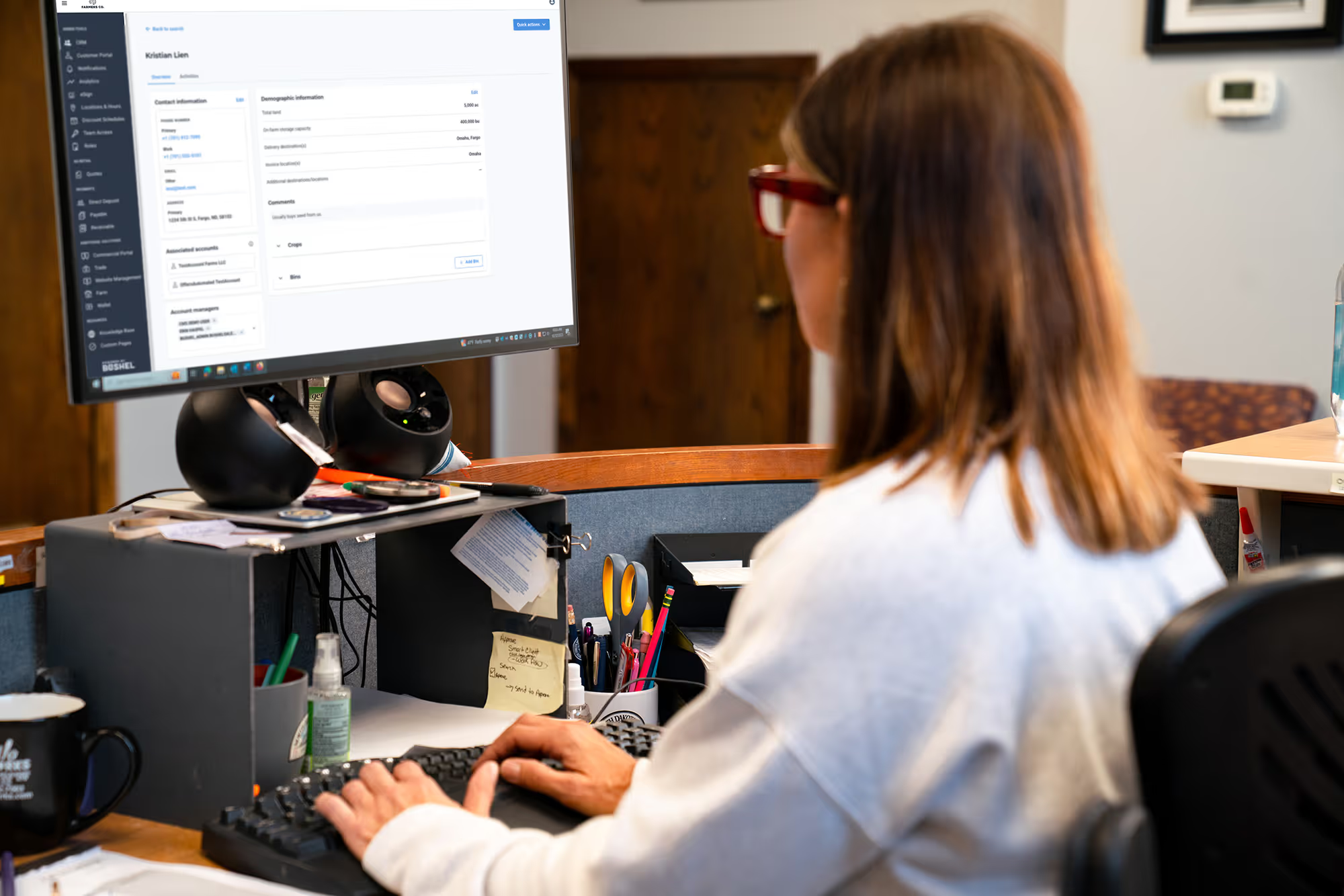
Hey, everybody. Thanks for joining us today on our webinar for Emotional CRM and quoting tool. Excited to have you guys with us. We'll get started in just a couple of minutes here, but while we're kinda waiting, if you could, in the chat, just drop where you guys are from, maybe which company you're with, just kinda get an idea where everybody's watching us from today. And then also too, this is being recorded, and we'll share this out with everybody after we're done today. And we want this to be really interactive for you guys too. So we do have the chat, and we have the q and a section. You'll be able to drop any questions, any comments, anything like that. We'll do our best to answer the questions as they come in, and we will have some time to go into q and a at the end here as well. Alright. I suppose I can introduce myself too. So I'm Alex Tuttle. I'm a customer success manager here at Bushell. I've been here a little over three years now. I'm partnered up with my brother, Matt Alford. He's an account executive here at Bushell as well. We've got we've got Reikman sales and service and Mike, the Desert Coast of Antarctica. Winnipeg, Canada. Cool. Cool. Yeah. We're excited to have you guys in today. We're gonna cover the CRM. We'll cover the quoting tool. And then, at the end, we'll kinda give you a little sneak peek to what we're coming up next with. So with that, I'll kick it over to Matt, and we'll get started on the CRM. Perfect. Thanks, Alex. We are excited to walk you guys through CRM. We really wanted to take the opportunity today rather than just walking through the tool, give you guys some, of the feedback that we've gotten on how different businesses are using the tool, not just to log notes, but really to generate new opportunities and to find lost opportunities that may be slipping through the cracks. So, we're gonna take this from a pretty high level, in terms of CRM and where you can go in and find some of this information. Some of it will be dependent on what we can pull out of your accounting system today, but it'll at least give you an idea of where you can find stuff. After we go through CRM, I'll pass it off to Alex. He'll walk through the quoting tool and how people are using that and also using it as a lead generating tool. We're excited, for some of the opportunities there. And we'll kinda use the the last bit of time at the end to walk through what we have coming down the pipe, with some of the AI features with Buddy, that some of you have probably seen. So, we're looking forward to it. First things first, we'll start here within CRM. As many of you know who are using CRM today, all of this information in terms of customers that we're pulling into this, we're pulling right out of the accounting system today. So you aren't having to start with a blank slate. We're pulling your customer list in here. So day one, you've got the functionality to be able to view your customers. Things like prospects in this list too. So if there's folks who you don't want in the accounting system yet, but maybe you've had some conversations or maybe your sales team is having conversations with some folks in the area. You can go ahead and create a new profile here, to begin logging some notes on those folks. Once they start doing business with you and you put them in your accounting system, we'll link those two records together. So that way you can have everything beforehand as well as the new accounting information coming in. Something that we have found to be, particularly helpful in CRM is the way that folks are setting it up. So, today, we have the ability for you to assign customers to yourself or to multiple members of your team. We found it helpful that your salespeople, or whoever's dealing with them, maybe both on the grain or the ag retail side, that you have folks assigned to that customer as well as some managerial oversight for that customer. So we typically see anywhere between two to four people assigned per customer record. That helps there be a pretty wide range of who is able to see quickly and sort quickly through a customer list. So when you come into a customer record, I'll pull up Corey here as an example. You know, he's got a few different account managers here within our internal tool that we're using. So you can see, folks like Dan, Aaron, myself are all logged as an account manager in here. You could have as few as one or as many as your entire staff log to a customer, but we found it helpful to kinda have that two to four range seems to be about perfect. So let's walk through the tool whether I I wanna do it really from the managerial perspective of of how we see, folks using this day to day and really the value they're getting out of it when they dive into this tool. So when they come in, again, they're gonna see a list of customers. We're gonna get back to that here in a second. But the first thing that managers are doing is and this may seem obvious, but they're coming in here and checking to see what tasks have been assigned. We have managers who will assign tasks to themselves for people they wanna follow-up with. But something we're also finding great success with is when their salespeople are giving them activities to maybe reach out to folks that they're having difficulties following up with or if they need the kind of that manager's touch, on a deal they're working. It's helpful for them to be able to give tasks to their managers. And so they're logging notes and then assigning tasks out to their managers to be able to come in here and see what needs to have some follow-up. So I can come in here. I can see I've got an overdue task to, help with Johnny. He has to collect a payment that sixty days overdue. We're finalizing a crop plan with Lacey, and then John needs some pricing. So I've got some activities right in here that at the beginning of the day, I can get an idea of some things that I can need to accomplish, before I close out if I'm gone. So, that's that's my tasks, really from the manager side. Now in terms of driving new value, which I think is the the big piece that we wanna focus on today, you can come in here to the customer list, and you can sort these customers by the date that they were last contacted. And so what we're recommending is that managers come in here, maybe spend ten minutes in the morning, and take a look at who are the folks that are assigned to you. Again, if you follow that process of you have customers assigned to you and your salespeople have the same folks assigned to you, as managers, you're gonna have a larger list of people to pull from. And so you can come in here and see, okay. How long has it been since we've last talked to somebody? We'll use Carson here as an example. It's been almost five months since we talked to Carson. So I can pull up Carson's profile. And within CRM today, you can see some of the accounting information we're pulling out, things like delivery, destinations, and invoice locations. Her contact information's in here. I can see any of the split accounts, So she's got a sole prop account, looks like, and maybe something she's doing with the family, with this LLC. So I can take a look in here just to get a quick overview of what Carson's, operation looks like, and then I can come in here and see any activities, that have been logged. So it's just task to call Carson that hasn't been completed. I can see she hasn't done business us or business with us this year, and so there's this task created to make sure we follow-up with her. Obviously, that didn't happen in the past five months. So this would be a good opportunity for me to go in here and see, okay, what has Carson done with us? So coming in to customer view, I'm now viewing, the Bushel portal from Carson's perspective. What's helpful about this is I can pull out some of the information you have in your accounting system today in a really quick and a really easy format to read that's just enough to be able to find some opportunities. So coming in here, what's probably best to do is to take a look at scale tickets to see, okay, has Carson delivered any grain to us in the past year? Looks like the last scale ticket we have for her is in May of twenty four, so that would not be the case. I'm gonna come down to contracts. Maybe she's contracted some grain with us this fall and that, you know, just hasn't gotten around to delivering yet. With harvest coming up, I can see that isn't the case either. And maybe go down to invoices here and see if she's got anything that she's put purchasing from us on the, input side. And same thing. The last thing Carson did with us business wide was was in May of last year. And she had a pretty good relationship with us before then. I can see that contracts were coming in pretty steadily. I can see down here in scale tickets that we had a steady stream of scale tickets coming in. So this is a good opportunity for me to make a note of this, and I may assign this out to my salesperson. So maybe in some alternate reality, Alex is reporting to me. I wish that was the case for sure. But I'll put a note in here and say, you know, Carson, hasn't done business in twenty twenty five. And then I can create a follow-up task. I'll assign that to Alex, and I want him to have that tomorrow to say call Carson and see if we can earn any business. I'll go ahead and save that. And now we've got that note and a potential opportunity available to follow-up with Carson. And, again, there's a few different examples of how we see this typically play out. Usually, there's somebody who is bought a lot of inputs from us but isn't delivering grain. If you are a full service coop, we'll see vice versa of that delivering a lot of grain, but not purchasing a lot of inputs. Something we found interesting is folks are finding going through that process that they may have a lot of folks delivering high volumes of grain, but maybe are only purchasing a few inputs from them, and odds are they're getting it from somewhere else. And so if you go through that process, it it's a it's a manual a little bit of manual work to do it. But you can see in just a few minutes, you can start to find some opportunities for your team. And so we recommend that managers go through and find a few opportunities every morning and that we train your salespeople to do the same thing, that they would go in, find opportunities for themselves, and be able to create tasks. And the advantage of you being logged as an account manager on those same accounts is you'd be able then to go in and see, okay. Are my team are they actually following up with these people that they're supposedly creating task for? So if I come back here to this list and I come back to my customers, I can, like I said, sort it by the, you know, the one that was the furthest out. I can also sort it by the most recent. So in this case, I can see, you know, Alex who? Alex, are you gonna get put in the wringer here? He last contacted John eight days ago. So I can pull up John's profile, see his activities. And I can see that John called, and he had sold corn. He mentioned that he needs some more feed in the next two weeks. And, oh, this task is actually for me. So I'm the one in the who's gonna get in the the slammer here. But Matt needs to call John to sell him feed. And as a manager, I'd be able to come in here and see that Alex created that task for me almost eight days ago, and I still haven't completed it. And this is a good one to go ahead and ping myself on and say, hey. You need to follow-up with John to get that feed sold. Alex, you obviously have worked in the the elevator environment before. I'm curious your thoughts on some of these processes and and maybe some ways you see this working out. Yeah. And one thing to highlight too, all of this can be done on the fly. You don't have to be at your computer. If you have an inter Internet browser on your phone, you can get into the CRM. Or with your company's app downloaded, you can log in with your work email, access all of this. And then one thing to highlight as well, in terms of just, like, cross department collaboration, like, if you have a fuel team, if you have an energy department and they're delivering fuel to a guy's farmyard and they're talking to him about where he's hauling grain, giving them the access to at least jot a note down and tag a merchandiser like, hey. Matt's hauling to one of our competitors. Are you guys aware of this? Just having that full company communication across you guys' customer base. But, yeah, working from at the elevator too, this would have been great to have, especially just being new to the elevator world, not knowing a lot of the tribal knowledge that gets passed down from generation to generation. So just having any sort of access to look up this farmer is used to doing things like this compared to this guy. So any sort of insights that could be passed down to new new employees, especially, really benefits. Yeah. Those are good points. Yeah. We've heard too a couple ideas too on taking notes because we know, you know, you guys are you guys have busy days and need to get this you know, you want this to integrate with your day to day, not to create a whole brand new process for you to adopt. We have a lot of folks using the talk to text feature that's in Android and iPhone that you can, you know, just use the microphone and actually talk a note out. Those have gotten really, really good in the past couple years. And so we have folks who will do that. You know, they're driving away. They'll just take the note real quick on their phone that way, which makes it easy. And to Alex's point about knowledge loss, you know, we see that obviously when turnover happens. But we also see that happen, and we've seen customer frustration when somebody has to reexplain their situation to somebody because maybe, you know, your sales rep is out or poor notes have been taken, and so no one really knows the background of what's happening. Having a tool like this and just having some quick notes to be able to see high level comments on you know, I can see John does business with his brother, Matt, and they're going through a transition to sell or for John to sell his assets to Matt. Like, that's just a helpful piece of information to have when I you know, if I'm taking a call because Alex is out, for the day. And being able to see what the last activities are on somebody, it's a helpful way for your team, to to go into those conversations more confident, and really to provide better customer engagement in those conversations, because they're not fee they know that everybody in the agribusiness is gonna know what's happening with their account. It's just a better experience, overall. Alex, I think I'm gonna pass it off to you to go ahead and walk through some of the quoting pieces and and maybe some ways that we're seeing leads be generated through our our quoting tool. Yeah. Sounds good. Let me get that pulled up here. Alright. So, yeah, what Matt was showing you guys was in the CRM. This quoting tool that we have here essentially lives in the same portal for your guys' staff. So you're not having to navigate to a new login or anything like that. On the the main page here, this is gonna be all my quote history from my company. We have the option to filter that. So if you wanna sort by maybe your salesman, let's say we can pick on Matt here as well. I just wanna see the quotes that Matt has prepared here. So I can see we've got couple that are expired. So maybe it's worth noting to look up at that account, Daniel Huckaby. So let's see why was that expired. So then again, going back to the CRM, I can go assign maybe Matt a task to, hey. Follow-up on these quotes you guys have. And the way the quoting tool works so you guys are in control of the products and the price that are displayed for your staff to look up and your farmers. The farmers do not have access to that price initially. They have the option to request a quote from you just by the product. We don't really want that price sensitive pricing information just totally out to the public. Similar to, like, make offer where your farmers are using our tools to sell you grain, now they have the option to to initiate some sales on the retail side as well. So when you guys upload the product list to us, then you guys are able to create quotes. Your farmers can request them. Creating a quote is very simple. I like to put myself back when I was working at the elevator and, you know, it's a weekend during harvest. There's no agronomist there, and somebody's picking up chemical, and you're just giving them the chemical and maybe a handwritten receipt that it was taken. There's no real price share, and then the farmer just gets the bill at the first of the month or whatever, which usually can be good or bad. Maybe they're a little bit shocked on the price that they picked up. So we wanna have a little more transparency on that side of things for just your entire relationship with you guys' business. And then also too, if you guys have any questions or anything like that, feel free to use the q and a button or just drop it right in the chat, and we can get to that, which I don't even know. I haven't even looked. But so if we wanna create a quote, let's say I'm working with Matt Alford here. We can look him up. And, the account name, if they have multiple entities, if they have, like, Alfred Farms, they have the option to attach that as well. Customer name's Matt Alfred, and we're working with him on his soybeans for next year. Field name, however descriptive you wanna be. If we wanna go Lee Township, section five Northwest quarter, if you wanna get that specific, you can. Acres, do a hundred and forty five. This is gonna be for next year. So we're gonna look at bean spray twenty twenty six for the quote name. The option to put an expiration date on there. So let's say we just wanna give them a couple months to look this over, and then it's obviously prepared by myself and the product list. So based on which products you guys upload on here, you have the option to do that. So let's just say we're gonna do some Atrazine, and he's gonna do a full tote two fifty gallon. And then we have the pricing information there. So comments for customer, we have customers using this box for anything from, like, EPA regulations or just like the recipe. Somebody's picking up some spray for their yard. Like, you can put the recipe and how many gallons they need in there. Private comments, if you just want something internal on the quote, you have the option to do that as well. Is there a way to make the display bigger? Let me see if I can make my screen bigger here. How's that? That must be a lot better. Christian, let me know if that's better. And additional services. So if you know the farmer wants this delivered or if they want it picked up, you do have the option to attach that into the quote as well. If you're gonna do the custom application, you can put your applicating fee on there. And any description, let's say, start north, work south. Let's say we want that applicated in a couple weeks. And now we have the option to kind of review it and finalize. If we want a manual discount on here, we have that option as well. So let's say we're gonna take hundred dollars off new customer discount. Save that. And then we finalize it. So now we have we have three options. So we can download the PDF, we can shoot them a notification to the app, or we can just send them an email right there. If we download the PDF, this is what it's gonna look like. So this will all be branded to your guys' company information. All the info that we did on the quote building process is here. This now gets sent to your farmer. They have the option to approve it or deny it, and it's the exact same flow for the farmer requesting a quote from you. So they can go into the app, and they can say, hey. I want a quote on chemical or I want a quote on fertilizer, and that sends it into your team so you guys can use that as a lead generation aspect as well. Then from there, I can go to quotes, and then it's gonna be right there. So I do have the option too to withdraw it. If I made a mistake on it, we can withdraw that as well. So if there's any questions, I should take a look here and make sure everything's good. If my farmer doesn't have my app have our app, can he still get a quote? Yes. Yes. He can. So if I let's go back to the finalized screen here. Oh, I lost my screen share. So the email option here, you can send this to any email address. So if you're a farmer, old school with the flip phone, but they still use an email address, You can send that to there. You can enter multiple email addresses. So they don't necessarily have to have the app to be able to receive the quote. They do need the app if they wanna log in and submit a quote to your agribusiness. Good question. But that is our quoting tool. So excited to show you guys that. And then I believe next, we're gonna kind of walk through kinda what's coming up in our world here. So, Matt, if you're ready with that, we can alright. So we're back in the CRM. You're probably asking, well, what's new? And our faces are in the way here a little bit. But down on the bottom right, a little chatbot we have there, that's what we call Buddy, which is our AI chatbot. Buddy is a pretty slick tool. So he connects into the CRM data as well as right now, we have contracts and invoice data from your guys' accounting softwares. We're gonna be putting in a lot more information into Buddy, but he does a really good job of giving some really good insights and analytics onto you guys' customers. And, like, this one example we're doing here, how much grain did Carson Aldrank contract with me in twenty twenty four? So Buddy's gonna go and look up Carson's account and find out that answer for us. I think it's important to note too in you know, as we're in the early stages of Buddy, Buddy's gonna show you the thought process of how he's thinking through the problem. When we have this released early next year, full you know, completely done, ready to go to market, it'll be able to do this process behind the scenes and a lot faster. But, for right now, you get to, to watch him think through it. If only I had some good jokes. But it's it's kinda funny, though, how spoiled we are in the age of AI where I mean, we're really not waiting that long, twenty, thirty seconds, but we're so used to snap your fingers. I know we're pulling up some of the great information here, Alex. I'm curious in your role. I guess we got it pulled up now. But, I'm curious to hear when you were at the elevator, are there things that you would have thought to use this for in terms of pulling up information for customers? Yeah. I mean, especially working in the scale room, dumping all the trucks, like, being able to ask, like, how much grain is left to come in on new crop, or this farmer's hauling, how many contracts does he have left? And then I can use that information to make decisions on space and if I need to start into a new bin, stuff like that. Yeah. Which I think is interesting because that highlights the importance too of of really getting using that information in the CRM today. So that way and, obviously, things like contracts are pulling out of the accounting system, but taking good notes today is gonna make a platform like this significantly more useful once, you know, beginning of the year comes around. Right. Especially for a lot of reporting aspects that Buddy can do. So it looks like we got our answer. Carson contracted eighty thousand units of grain. If we need more details, let me know. So so, yeah, let's find out what Carson's done in twenty twenty five, and we can use that information to kinda run, like, our own little gap report. So she has zeros. She hasn't sold us anything, and we're it's September already, so we might might be scraping there. Yeah. So now with that information, kinda goes back to Matt's example on CRM where, like, hey. Let's assign somebody to start working on cars and do the outreach, try to get the grain or the chemical, any sort of kind of business drivers you guys can think of. And then another thing we could ask, buddy, like, let's go for, like, a CRM specific question. How many overdue tasks does my team have? Something like that. Because with the CRM data too, you're gonna be able to you can have Buddy analyze all the notes and run a, like, a farmer sentiment report for your whole customer database, which is, like Matt said, the more notes, the better for stuff like that. Let's do show for each account manager, which I think this is interesting too because, I know, this is kind of the hope Alex and I had walking through this. We wanted to we wanted to walk through, like, what does this look like on the like, how do you how do you do this manually? Like, what's the long division for lack of a better analogy on how do you find this information today? And then, you know, come next year, come tomorrow, what is what does it actually look like to find you know, to have a tool that can find this information for you? And Buddy's given us a nice some nice trouble here. Let's try, let's try it. Show me the number of outstanding tasks. Let's try it more specific here. Let's see. Do we have any other questions out there? So here's a good example. Erin's staying on top of her tasks, so, like, it's an easy way. And, again, this would when Buddy's working full force, I guess she has one outstanding that he was able to find. But when she you know, when Buddy's working full force, he's able to then pull that list and create a a little spreadsheet of how many outstanding tasks. He can start to break out what are those outstanding tasks. So it makes it a lot easier to rather than having to go through person by person on your team to see, hey, who's keeping up with things and who isn't, but he would be able that'd be part of what you could do in the morning. Just pull those outstanding tasks. And it makes it easy then to go into your team and say, hey. I saw this is outstanding. You know, just wanna make sure you're staying up on it. And, I mean, Alex and I know when we're when we're, you know, calling folks like you guys, it's it's not that things usually slip through the cracks. It's usually something is you know, something's come up or there's a reason we're waiting to reach out, and so it's helpful to get some clarity on those pieces. Great. Do you have any other questions, Matt, for mister Buddy? I'm trying to think what else we could do with him. Maybe let's do show me my five largest customers. Oh, let's do largest customers. I wonder if I made the list. Customer a, b, c, d, and e. There we go. Usually, it tries to populate those names after this. I can do it. But at least we got the acreage there. So, again, in time, he's still thinking through and learning some of these pieces, but that's why, he may not be available in full force yet. So Oh, we got a question in the chat. Can you use Buddy on your phone? Yes. Thanks, Luke. Yeah. So, yeah, we'll take a little time here for some q and a. If you guys have any questions, feel free to drop them in the chat. We'll give you guys a couple of minutes here to send some our way. And then if not, we will wrap things up, let you get back to your day. Alex, I know a question I've gotten before, in terms of quoting. Do we obviously, we show the product list. We're not showing prices. Can do growers need to select a product or can they like, what all is required for them to actually submit a quote? Yeah. That's a good question, Matt. They they have the option to just submit a just a blank quote to you just to kind of initiate that they wanna be contacted. So they don't really I think all they're required to do is leave their name. So we don't want them to have to be put on the spot to they have to pick something. But if they just want to initiate the conversation, maybe they're a new customer snooping around. You never know. So Sure. Good question. Luke had a question here too. What are other good ways to use my phone for CRM? What are other good ways to use my phone for CRM? So like Mal was saying, the voice to text option is huge, and I think just the flexibility of being on your phone is tremendous if you're out and about and everybody's got their phone on them. Especially if you're out meeting with the farmer, just pull up your phone, go to the CRM, jot down what you need to jot down while it's front of mind versus waiting till later or you forget at the end of the day. So just having that access to do it quick. And that tool is updating live. So we have folks too. The the thing that's handy about it is if you go on the road and and maybe, hey. I was like, hey. I need to get out to somebody. Can you know, mister manager, can you create this quote for me while I'm on the road out there? There's you have the ability to access information as it's coming into the tool. And so we found that to be a helpful piece too that, you know, you're not having to okay. I need to get everything aligned for the day before I head out. You can start to do some of those pieces manually, while you're out on the road. Great. Well, yeah. Well, thanks everybody for your time. We will be emailing this out. So if you have any other questions, feel free to contact your CSM. We do have a link up here. Learn more about CRM. You can go to our website and visit any information. But we appreciate your time with us today, and have a happy and safe harvest to you all. Thanks, everyone. Bye.